How-To Guide
What is the best AI marketing agent for small business social media?
AI marketing agents for small business social media compared by what they do alone: drafting, planning, publishing, replies and reports, with prices.
Pick by how much you want the AI to do without you. Buffer drafts and schedules (free for 3 channels). SocialBee's Copilot proposes platforms, a schedule and posts from $29 a month. Hootsuite also replies to messages and writes research reports from $99 a month. Superdirector, which we sell, does brand research and creative planning from $29 a month.
- Define five jobs: draft, plan, publish, reply, report; decide which need your approval.
- Name the scope: what the AI runs daily and what stays with you.
- Claude drafts and organizes; posting needs a publishing connector or the operated account.
- Approval controls: Buffer Team, SocialBee Accelerate, Hootsuite publishes approved content.
- Trial one real week and count drafts published unchanged, edited or discarded.
Pick by how much you want the AI to do without you
There is no single best one. The right pick is the tool that does the jobs you want to stop doing, with an approval step where you still want one. For a solo owner who mainly needs posts written and scheduled cheaply, Buffer is the simplest start: its pricing page lists the AI Assistant on Free, Essentials and Team alike. If you want a tool to propose the whole plan (which platforms, what categories, a posting schedule, the posts), SocialBee's Copilot does that, on plans from $29 a month. If replying to messages and research reports matter as much as posting, Hootsuite goes furthest on its own, on plans from $99 a month. Superdirector, which we sell, fits when you want brand research and creative planning done from your brand's own context.
Who wrote this: we make Superdirector, one of the four tools below, and we rate it on the same five jobs as the rest. Buffer, SocialBee and Hootsuite details are taken from their own help, product and pricing pages as they read on November 6, 2026. Superdirector details are taken from our pricing page and published product notes. We have not run the other three on a real account, and we do not grade how good their AI writing is.

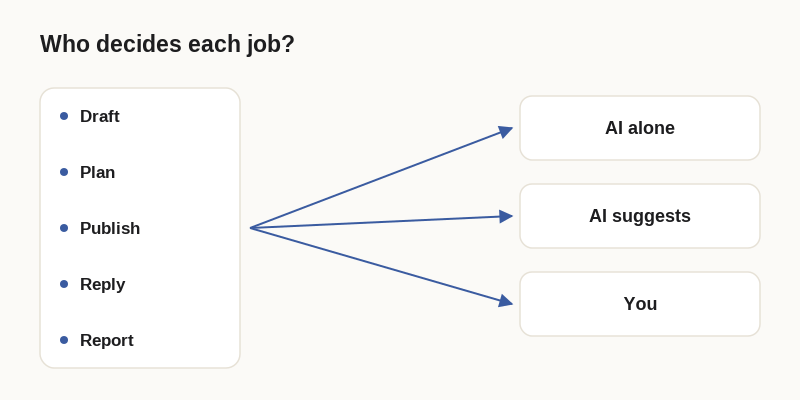
Place each job where the tool actually handles it, then decide where a person stays in the loop. Original diagram, based on the vendor product and help pages read November 6, 2026.
 Superdirector
Have your AI do this for your brand.
7 days free, then $29 a month.
Decide which jobs the AI may do on its own
Vendors use "agent", "assistant" and "copilot" for very different things. A clearer test is to list the jobs and ask, for each tool, whether the AI does it, suggests it, or leaves it to you:
- Draft: write a caption or post from a prompt.
- Plan: propose platforms, themes and a posting schedule.
- Publish: put approved posts live at the planned time.
- Reply: answer comments and messages.
- Report: read the numbers and say what to do next.
Then decide where you want a person in the loop. Buffer's own help says to "double-check any suggestions it offers". That is good advice for every tool here. The more steps a tool takes alone, the more an approval setting matters. The autonomy ladder puts the four tools on these five steps.
Compare the four on autonomy, approvals and price
| Tool | What its AI does (vendor's description) | Approval control | Published starting price |
|---|---|---|---|
| Buffer | Drafts captions from a prompt, rephrases, shortens or expands; generates ideas from your business and audience | Approval workflows on the Team plan only (pricing) | Free for up to 3 channels; Essentials $5/month per channel and Team $10/month per channel, both billed yearly |
| SocialBee | Copilot recommends platforms, organises content categories, builds a posting schedule and generates ready-to-edit posts | Post approval from Accelerate; client approval workflows | Bootstrap $29/month (monthly) with unlimited AI content generation; Accelerate $49/month |
| Hootsuite | Drafts in your brand voice; generates campaigns and calendars; AI inbox replies; Yeti Agent research reports | Publishes approved content | Standard $99, Professional $199, Advanced $399 (per user a month, billed annually, per Hootsuite's plans page) |
| Superdirector (ours) | Brand research, ideas, scripts, carousels and X posts from your brand context | Publishes eligible Instagram carousels and single X text posts on Growth once posting is turned on for the account | Starter $29/month (300 credits), Growth $199/month (2,000 credits) |
Two cautions about the table. First, price units differ: Buffer charges per channel, SocialBee per plan with a profile limit, and Superdirector by monthly credits. Compare the cost of the accounts you actually run. Second, AI allowances differ. Buffer's AI Assistant has had unlimited credits since its October 2023 update, SocialBee lists unlimited AI content generation on Bootstrap, and Superdirector meters work in credits.
Read what each one does on its own
Buffer: an assistant inside a scheduler. Buffer's help page describes drafting help: give it a prompt of at least four words and it writes a draft you insert, regenerate, rephrase, shorten or expand. In the composer it is channel-aware and keeps an Instagram post under the 2,200-character limit. The posting itself is Buffer's scheduler. The AI Agent Index scores Buffer 2 out of 5 for autonomy, and notes that Buffer now publishes its own MCP server, which lets outside agents (it names Claude and ChatGPT) post through it. Pick it when you want to stay the author and just write faster.
SocialBee: an AI that proposes the plan. SocialBee says Copilot recommends platforms, organises your content categories, builds a posting schedule and generates ready-to-edit posts, then adapts captions and tone for each platform. On SocialBee's pricing page, Bootstrap covers up to five profiles at $29 a month on monthly billing. Post approval, if you want a second person to sign off, starts on Accelerate at $49. Pick it when you need a plan more than a writer.
Hootsuite: the most autonomous of the four. Hootsuite's AI page says its AI drafts content in your brand voice, generates campaigns and content calendars, and publishes approved content. Its inbox can sort messages and resolve them with AI-generated replies. Its Yeti Agent "autonomously scans billions of data points" and delivers a plain-language report. Its plans page says paid plans start at $99 for Standard, priced per user a month and billed annually. Pick it when replies and reporting are the jobs eating your week, and check which plan includes the AI features you need.
Superdirector (ours): brand research and creative planning. Superdirector builds a brand summary from sources you add, then prepares ideas, scripts, carousels and X posts from it. The pricing page lists Starter at $29 a month with 300 credits, which you use from the AI app you connect, and Growth at $199 a month with 2,000 credits. Growth adds scheduled runs and, once posting is turned on for the account, publishes eligible Instagram carousels and single X text posts by itself, after one warning that names the account; your connected AI app cannot post by itself. Finished AI video is upcoming, not available yet. Pick it when the hard part is knowing what to post for your brand, not pressing publish.
Match the general agent lists against running a social account
Searches like the one that brought you here also turn up general small-business AI-agent rosters, and Marblism's 2026 list is a clear example of the type: it sorts tools by the first job to hand off (after-hours calls, inbox and calendar, customer support, lead outreach, or several roles at once), not by the five social jobs above. Blotato's small-business guide makes the same point from the marketing side: it splits marketing into five jobs (think, create, design, distribute, convert) and tells you that, between two tools for the same job, you should pick the one an agent can operate. Both framings help, but neither answers the question this page was written for, so it is worth seeing what each entry means for a social account.
| Entry on the general lists | What the entry says it does | What that means for a social account |
|---|---|---|
| Marblism's Sonny (Marblism's list) | Marblism says Sonny watches TikTok, Instagram and LinkedIn daily for trends, then creates photos, videos and posts in your tone | Social arrives bundled inside a seven-employee platform (all on every plan); it is the vendor's description of its own employee, and the list does not test it on a real account |
| Zapier Agents (same list) | Act across connected apps; the list's own wording is that agents "can only act in apps the user has connected" | A social-account run exists only if you wire one in Zapier yourself; the list points buyers who want a pre-built employee elsewhere |
| Manus (same list) | The list's verdict: "Built for deliverable work, not standing business operations. Not the right tool for inbox, calls or social" | Ruled out for social by the list itself; it is a project-work agent, not a standing operations one |
| Rosie (same list) | Described there as a 24/7 call answerer that books appointments and texts the owner the details of every call | A phone desk, not a social account; social is out of its lane by the list's own account |
| Blotato | Schedules everything from one calendar to nine named platforms, and its guide's own filter is to prefer the tool an agent can operate | The social-specialist side of the same buyer's search: distribution covered, and the operate-with-agent choice is its guide's stated criterion |
| Superdirector (ours) | Researches, generates posts and carousels, writes video scripts and, on Growth, posts eligible Instagram carousels and single X text posts after posting is turned on for the account | The operated case at $199 a month for one AI-run operated account; the pricing page lists two account slots, extras $99 a month each: the account runs on a standing posting permission, not per-post sign-off, and the breadth of the general rosters is traded for one channel done end to end |
Wherever you shop, Marblism's own list supplies the filter that matters here. On approval: "If you have to approve every action, the agent is a drafting assistant, not an employee." On failure: "An AI agent will hit something it cannot handle. The question is whether it routes that to you cleanly or leaves the caller with silence." Apply both to a social account and the real choice is between an operated service, where posting runs under a permission you set once, and a general agent you configure yourself across connected apps.
- Check which job the list keys on. Calls, inbox, support and lead rosters answer different questions from the five social jobs above; a social-account answer should say which of draft, plan, publish, reply and report it does.
- Check the metering. Marblism meters AI work in 50 included hours a month, which its entry says only advanced AI actions consume; Superdirector meters credits; the schedulers above charge by channel or plan. Price at the number of accounts you really run.
- Check what changes hands. A general agent configured across connected apps leaves the setup and the watching to you; an operated service holds the schedule and the posting switch; a bundled social employee is one role inside a wider platform.
One honest note: none of the lists read tests its agents on a real social account, so treat the entries above as descriptions, not measurements. If publishing itself is the job you want off your plate, the shortest paths are still the social tools in the comparison above: Buffer's Team approval workflows, SocialBee's post approval from Accelerate ($49 a month), Hootsuite publishing approved content, or Superdirector's Growth for the operated case. For everything beyond social, Marblism's pitch is breadth: seven employees covering inbox, calls, social, SEO, leads, website and contracts on one plan at $24 a month billed annually.
Name what runs the posting: agent, layer or operator
Arriving here from a general agent roundup leaves one question the comparisons above have not named: can the agent you already run all day, Claude Code or Claude Cowork or ChatGPT, actually run the social account. The roundups read for this page ask it too. Blotato's tested list of twelve agents tested that one question and reports that not one agent posts on its own, because agents write and call tools while none of them holds a platform credential; the posting happens in a separate publishing layer, which ten of the twelve reach over MCP. The same guide's manager framing puts the bar plainly: a manager "has to publish", and a tool that stops at the caption is "a fancier text box" (its manager guide). Blaze's guide to AI social media bots starts from the same point when it separates what the word bot can mean: "a tool that prepares drafts, a connection that publishes approved posts, or software that generates interactions", where only the middle one is a posting answer.
| Shape | What does the posting | Where approval and watching sit |
|---|---|---|
| The agent you already run (Claude Code, Claude Cowork, ChatGPT, Gemini CLI; per Blotato's tested list) | Nothing by itself. The list's finding is that agents reason and call tools and hold no platform credentials, so the post does not go out from the agent. | Approval sits outside the agent, in whatever layer it calls; the list credits scheduled runs to particular agent surfaces (it names Claude Code's Routines, which runs a configured task on a schedule, from an API call or a GitHub event), not to agents in general. |
| A publishing layer the agent reaches over MCP (the layer and manager framing of Blotato's guides) | The layer holds the accounts, the posting queue and the platform permissions, and performs the post when the agent calls it; the guides describe exactly this split. | The review step and the stop or correct switch live in the layer; the manager guide calls the human review step load-bearing, and the tested list separates holding the queue and reading replies back from drafting. |
| Superdirector Starter at $29 a month (ours) | Nothing posts. Starter works inside the AI app you connect: live social data, ideas, scripts and downloads; it is the hands-on shape without the posting half. | You drive your AI app and review there, as you would today; no schedule changes hands. |
| Superdirector Growth at $199 a month (ours): the operated account | Superdirector researches and drafts in the account's context and, once posting is turned on for that account, publishes eligible Instagram carousels and single X text posts by itself; extra accounts are $99 a month each. | Posting starts only when you turn it on for an account, after one warning; you make the important calls, and spend and anything public or irreversible wait for you (per our pricing page). |
Three checks, all carried from the guides read for this page, apply to whichever shape you pick. On approval: decide per job whether a person reads before anything goes out; the manager guide builds a human read into the loop, and Blaze's guide tells you to "know which account a tool can access, which action it performs and how you stop or correct it". On reach: the tested list warns that browser-style posting breaks the first time a platform moves a button, and that a real posting layer holds the queue on its own infrastructure and reads comments and messages back, which is a capability worth asking about explicitly. On honesty: none of the guides tests these shapes on your accounts, and Blaze's version of a test is one complete workflow, a reviewed draft through to the returned status, so run the section below's one-week trial before paying for a year.
Read the category, then, as: the agent is the worker, the layer is the hands, and the operated service runs both for you on one account. If what you want to stop doing is pressing publish, compare the operated shape with the schedulers in the first table above on the account you actually run. If what you want is the research and drafting close to the agent you already use, the Starter row names the boundary: data, ideas and scripts from your connected AI app, no posting. If you would rather assemble agent and layer from other vendors, the two Blotato guides describe the pieces and their limits honestly, including the parts a manager cannot do yet.
Claude as a marketing agent: what it drafts and what posts
A search for a Claude marketing agent often lands on a page that promises the whole loop: Claude writes the post, then a connector puts it live. The order matters, because those are two products with two owners. Anthropic's Claude page, read November 14, 2026, describes a general assistant you point at files and tools: "Point it to files and tools you want it to access, give it a goal or an outcome you want in plain language, and it gets to work." The same page lists connectors, custom connectors and MCPs, scheduled tasks, and permission controls among the ways Claude can work. Anthropic's introduction to the Model Context Protocol calls MCP "an open standard that enables developers to build secure, two-way connections between their data sources and AI-powered tools." That is real capability. It is also not a social account.
Blotato, which sells the connector in exactly that kind of build, states the boundary in one sentence: "Writing is a language problem and publishing is an authentication problem." Its Claude guide's FAQ is plainer still: "Claude itself cannot authenticate to Instagram or LinkedIn on your behalf." The drafting is the agent's work; the posting belongs to whatever holds the account credentials, and that piece decides which platforms are covered and what comes back after a post goes out.
| Shape | What Claude does | What posts, and under what permission |
|---|---|---|
| Claude in a chat or Cowork | Drafts posts, plans a calendar, edits an image and organizes a month of ideas in your voice | Nothing by itself. You copy the draft out, or you call a connected tool. |
| Claude plus a third-party publishing connector over MCP | Drafts and calls the connector's publishing tools | The connector, on the platforms it supports, after you authenticate each account; Blotato's own FAQ says Claude cannot do that authentication for you |
| Superdirector Starter at $29 a month (ours) | Works inside the Claude app you connect: live social data, ideas, scripts and downloads for Claude to draft and organize with | Nothing. Starter is the hands-on shape, with no posting. |
| Superdirector Growth at $199 a month (ours): the operated account | Researches in your brand context, drafts, fills the month's calendar and runs the schedule | Superdirector, once posting is turned on for the account, after one warning that names the account. It publishes eligible Instagram carousels and single X text posts. Extra accounts are $99 a month each. |
Two cautions keep the table honest. The $29 Starter price buys Claude-side work, not a posting service; if publishing is the job you want gone, the $199 operated account is the shape that takes it, and the permission is set once for the account instead of once for each post. And a connector's platform list is its own claim: Blotato's tested list of twelve agents reports that not one of them holds a platform credential, so the connector's coverage, not the model's ability, decides where a post can go.
Dates matter here. The Claude pages and the Blotato guide above were read on November 14, 2026, and connector surfaces change often enough that an older screenshot proves little. What has not moved is the account boundary: a model can write, plan and call a tool, and the platform still wants an authenticated account behind the call. So the practical question is not whether Claude is a marketing agent. It is which half you want to buy: Claude drafting inside your brand context for $29 a month, or the operated account that holds the schedule and posts under a permission you set once for $199 a month.
What an AI marketer can honestly handle for a small business
"An AI marketer that handles it all" is the promise the search that brought you here keeps meeting, and the pages that sell it draw their own line inside the promise. Blaze's Autopilot announcement is the type example, and it is a labelled historical page: in its first line it says "This article describes an earlier version of Blaze and is retained as a historical record." It sells an "always-on marketing team powered by agentic AI" and splits the work in its own words: "You still lead the strategy. Autopilot executes." The same vendor's current chooser page carries the split back to the owner, heading its close "Keep the Decisions With Your Business" and telling you to "Keep the strategy and final judgment with the person who knows the business." Marblism's small-business guide, the loudest of the three about automation, still lists over-automation as a pitfall and tells owners "Don't completely disconnect from your social media. Review and approve content to maintain authenticity." So the honest question is not whether an AI marketer handles it all, but which parts move to it and which stay with you. Below is that split said in product terms for the operated account this page sells, with the parts no plan promises named alongside.
| What the operated account runs daily (Growth, $199 a month) | What stays with the brand |
|---|---|
| Watching accounts and keywords on Instagram, TikTok, YouTube and X, with each account getting its own viral ideas | Adding the sources it learns from, and keeping each account distinct, with its own audience, voice and purpose (per the pricing page) |
| Remaking the findings with AI as carousels, X posts and video scripts in your brand | The brand calls: what posts, what changes and what gets paid; never publishing invented reviews, testimonials, results or customers |
| Filling the calendar for the month | Video scripts are saved with your work, not placed on your calendar; filming and final editing stay with you until finished AI video ships (it is upcoming, not available) |
| Publishing eligible Instagram carousels and single X text posts by themselves once posting is turned on for that account | The switch: posting starts only when you turn it on, after one warning that names the account, the public effect and the cost; spend and anything else public or irreversible waits for you |
| Running on a schedule | You decide which accounts post |
Read the table's other side honestly too. The named daily job covers research, drafting, the calendar and posting into Instagram carousels and X text posts. It does not include customer replies, and the guides read here put the reason plainly: Marblism's guide says "AI can draft responses, but personal touches in customer interactions still matter." It does not include paid campaigns, email or website work, which Blaze's chooser page treats as separate evaluations of their own: "A draft, a recommendation, and a completed publication are different outputs." Finished AI video on any plan here remains upcoming, not available. One buyer check closes the section: when a page promises an AI marketer that handles it all, ask which rows of the table its plan actually runs daily and where the stop switch sits. The one-week trial at the end of this page measures the rest, because drafts published unchanged, edited or discarded on your own account is the only "handles it" count that transfers.
Decide between outsourcing, self-serve AI and an operated account
Outsourcing is the third answer to the question this page carries, after running it yourself and handing the account to a service. A contracted marketer or agency holds the plan, the drafts and the posting for a fee quoted to your business; that quote is not a published figure this page can verify, so the honest comparison is not dollars. It is what changes hands, what you review, and where the stop switch lives. Blaze's chooser guide makes the same point about comparing costs: "Include implementation, review time, and specialist tools in the comparison", and it tells the buyer to "Use a real task as the test" before any money moves (the guide read for this section).
| How the account runs | Who holds the plan and the posting | What you review and where approval sits | Published price where there is one |
|---|---|---|---|
| Outsource to a contracted marketer or agency | They hold the plan, the drafts and the posting, on the terms the contract states; write which actions, which accounts and the stop correction into it | You review what the person sends you, on whatever cadence the contract sets; approvals run inside their workflow, not yours | Quoted per engagement; no figure for this row appears on any page read for this article, so price it from your real quote plus the review time it leaves you |
| Run it yourself with an AI-assisted scheduler | You hold the plan; the tool drafts and the scheduler posts with your approval setting | You read every draft before it goes out; the approval tiers come from the comparison above: Buffer's Team workflows, SocialBee's post approval from Accelerate, Hootsuite publishing approved content | Published: Buffer free for up to 3 channels (Essentials $5 a month per channel), SocialBee Bootstrap $29 a month, Hootsuite Standard $99 a month |
| Hand the account to an operated AI service | Superdirector (ours) holds the schedule and, on Growth, the posting; you keep the strategy calls, the split the section above quotes from Blaze's own announcement | You turn posting on once per account, after one warning; you review outcomes and keep the stop switch, and spend and anything public or irreversible wait for you (per our pricing page) | Published: Growth $199 a month for one AI-run operated account (the pricing page lists two account slots, extras $99 a month each); Starter $29 a month is the hands-on shape with no posting |
Read the table down its honest edges. The outsourced row is not a reject: a contracted person still fits when the job needs work the services above cannot do, and ours cannot, for example, finished AI video, which is upcoming, not available yet. The self-serve row is the cheapest but carries every review in your week; the comparison section above shows what each tool's approval tier costs. The operated row prices the service, not the person: Growth replaces the repeating publishing work on a standing posting permission, and no row here replaces your judgment, which every shape's approval column above names. Whichever way you go, judge the choice on your own account: give a real brief, watch one week of posts, and price at your real number of accounts before you sign or subscribe.
Choose with a one-week trial on your own account
- Write down the two jobs you most want off your plate and the one you will never hand over (often replies to customers).
- Trial the tool whose AI does those two jobs, with approval on for anything public.
- Use one real week of posts. Count how many drafts you published unchanged, edited, or threw away.
- Check the price at the number of accounts and posts you really run, not the headline plan.
The scorecard has these columns ready. For a job-by-job view of what to give AI in organic social, see which organic social jobs to give AI. For tools judged by the output you need, see best AI tools for social media marketing.
Frequently asked questions
What is the best AI marketing agent for small business social media?
What is the difference between an AI marketing agent and an AI assistant?
Which AI social media tool is free?
Can an AI agent reply to my customers?
Does Superdirector post for me?
How should I test an AI marketing agent?
Can a general AI agent run my social account?
Can the AI agent I already use post to my accounts by itself?
Can Claude post to social media for my small business?
Can an AI marketer really handle all of a small business's marketing?
Is outsourcing social media cheaper than an AI marketing service?
SuperdirectorHave your AI do this for your brand.
7 days free, then $29 a month.